

Skip to Content Skip to Menu

CB Gallery 3.0: How do I remove the box " Have a media link to share"

2 days 17 hours ago - 1 day 18 hours ago #342605 by Toulouzing
Hello !

I have 2 concerns :
#1 : Import media ( photos) I still have the box " Have a media link to share" while i set URL Link to NO in the plugin
#2 : Photo gallerie viewer : I do not retrieve the button to get EXIF data I had with CB Gallery v2 - Where can i find the setting ?

Thanks !

 
Last edit: 1 day 18 hours ago by Toulouzing.

Please Log in or Create an account to join the conversation.

  • krileon
  • krileon
  • ONLINE
  • Posts: 49852
  • Thanks: 8517
  • Karma: 1465
1 day 17 hours ago #342609 by krileon

#1 : Import media ( photos) I still have the box " Have a media link to share" while i set URL Link to NO in the plugin

That's link sharing. Edit your gallery that you don't want link sharing within CB Gallery > Galleries then under Create toggle off links for the different media types.

#2 : Photo gallerie viewer : I do not retrieve the button to get EXIF data I had with CB Gallery v2 - Where can i find the setting ?

Same place as your #1. Galleries are entirely configured from that page. Review the settings carefully. Under the Validation tab in the Photos section you can toggle "Collect EXIF" on/off. Note EXIF data cannot be collected if you're using client side resizing.


Kyle (Krileon)
Community Builder Team Member
Before posting on forums: Read FAQ thoroughly + Read our Documentation + Search the forums
CB links: Documentation - Localization - CB Quickstart - CB Paid Subscriptions - Add-Ons - Forge
--
If you are a Professional, Developer, or CB Paid Subscriptions subscriber and have a support issue please always post in your respective support forums for best results!
--
If I've missed your support post with a delay of 3 days or greater and are a Professional, Developer, or CBSubs subscriber please send me a private message with your thread and will reply when possible!
--
Please note I am available Monday - Friday from 8:00 AM CST to 4:00 PM CST. I am away on weekends (Saturday and Sunday) and if I've missed your post on or before a weekend after business hours please wait for the next following business day (Monday) and will get to your issue as soon as possible, thank you.
--
My role here is to provide guidance and assistance. I cannot provide custom code for each custom requirement. Please do not inquire me about custom development.

Please Log in or Create an account to join the conversation.

1 day 17 hours ago #342614 by Toulouzing
Thank you Kyle, i think i set parameters as recommanded in the plugin Gallery and this is reason of my concerns.
#1 URL is off ( media , photo..) and i still have the box
#2 collect EXIF is on and i have pictures containing exif not resized. While displaying i do not see any link or button to show exif

Thanks again
Francois

Please Log in or Create an account to join the conversation.

  • krileon
  • krileon
  • ONLINE
  • Posts: 49852
  • Thanks: 8517
  • Karma: 1465
1 day 17 hours ago #342616 by krileon

#1 URL is off ( media , photo..) and i still have the box

Are you sure you've edited the correct gallery? What galley are you trying to make these changes for?

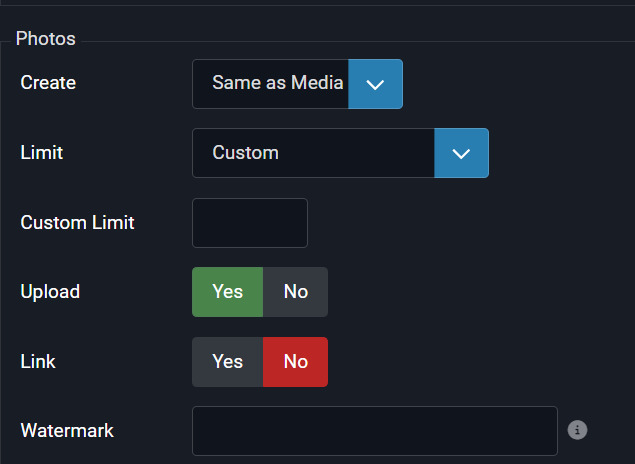
#2 collect EXIF is on and i have pictures containing exif not resized. While displaying i do not see any link or button to show exif

You have to completely turn off client side resizing.


Kyle (Krileon)
Community Builder Team Member
Before posting on forums: Read FAQ thoroughly + Read our Documentation + Search the forums
CB links: Documentation - Localization - CB Quickstart - CB Paid Subscriptions - Add-Ons - Forge
--
If you are a Professional, Developer, or CB Paid Subscriptions subscriber and have a support issue please always post in your respective support forums for best results!
--
If I've missed your support post with a delay of 3 days or greater and are a Professional, Developer, or CBSubs subscriber please send me a private message with your thread and will reply when possible!
--
Please note I am available Monday - Friday from 8:00 AM CST to 4:00 PM CST. I am away on weekends (Saturday and Sunday) and if I've missed your post on or before a weekend after business hours please wait for the next following business day (Monday) and will get to your issue as soon as possible, thank you.
--
My role here is to provide guidance and assistance. I cannot provide custom code for each custom requirement. Please do not inquire me about custom development.

Please Log in or Create an account to join the conversation.

19 hours 19 minutes ago - 19 hours 18 minutes ago #342632 by Toulouzing

#1 URL is off ( media , photo..) and i still have the boxAre you sure you've edited the correct gallery? What galley are you trying to make these changes for?
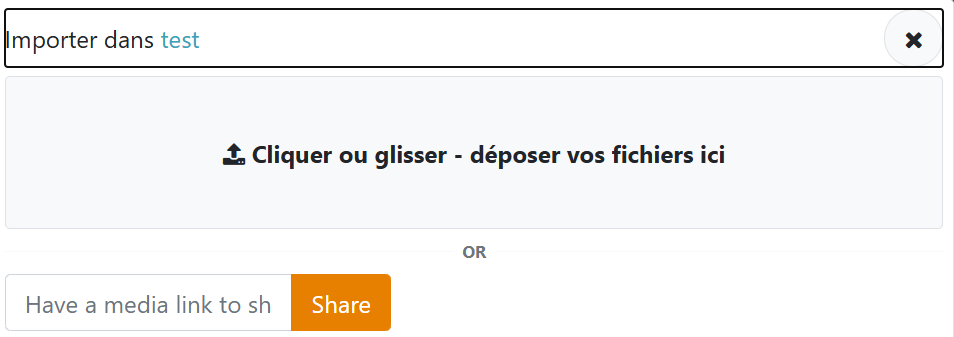
I edit the following in CB plugins : plugin galleries / profile gallery . Since beginning, I set the link toggle to "NO" ( see capture) . This is why i do not know why i still have the box in frontend when i want to import a photo (see capture )   


#2 collect EXIF is on and i have pictures containing exif not resized. While displaying i do not see any link or button to show exifYou have to completely turn off client side resizing.


OK It works now since I  turned off  the resizing AND the smoothing ! 
Last edit: 19 hours 18 minutes ago by Toulouzing.

Please Log in or Create an account to join the conversation.

  • krileon
  • krileon
  • ONLINE
  • Posts: 49852
  • Thanks: 8517
  • Karma: 1465
17 hours 47 minutes ago #342635 by krileon

I edit the following in CB plugins : plugin galleries / profile gallery . Since beginning, I set the link toggle to "NO" ( see capture) . This is why i do not know why i still have the box in frontend when i want to import a photo (see capture )

There is a link parameter for each media type. It's default enabled for Video and Audio media. Be sure they're all turned off.

As a side note the input box should not be small like that. It should span the full width of the modal window. What browser are you using?


Kyle (Krileon)
Community Builder Team Member
Before posting on forums: Read FAQ thoroughly + Read our Documentation + Search the forums
CB links: Documentation - Localization - CB Quickstart - CB Paid Subscriptions - Add-Ons - Forge
--
If you are a Professional, Developer, or CB Paid Subscriptions subscriber and have a support issue please always post in your respective support forums for best results!
--
If I've missed your support post with a delay of 3 days or greater and are a Professional, Developer, or CBSubs subscriber please send me a private message with your thread and will reply when possible!
--
Please note I am available Monday - Friday from 8:00 AM CST to 4:00 PM CST. I am away on weekends (Saturday and Sunday) and if I've missed your post on or before a weekend after business hours please wait for the next following business day (Monday) and will get to your issue as soon as possible, thank you.
--
My role here is to provide guidance and assistance. I cannot provide custom code for each custom requirement. Please do not inquire me about custom development.

Please Log in or Create an account to join the conversation.

Moderators: beatnantkrileon
Powered by Kunena Forum
