Skip to Content Skip to Menu

Help Implementing Options for diffent discounts for month 1 and 2

10 hours 11 minutes ago #343795 by STUCKSHUTTER
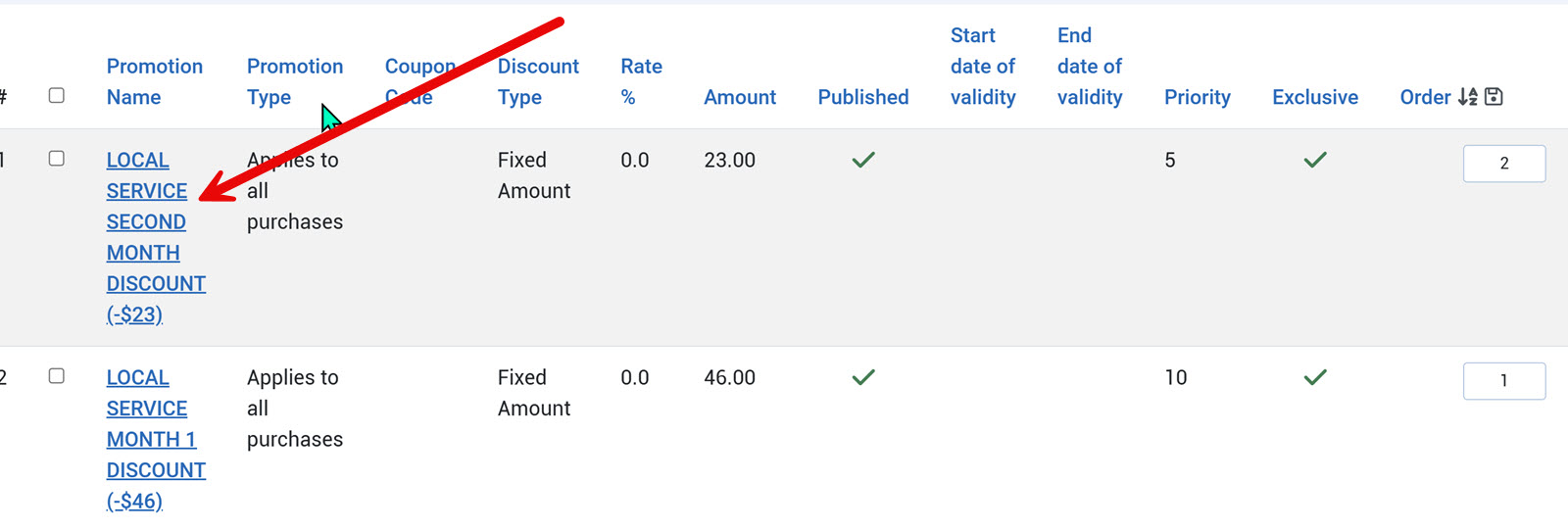
We are offering a subscription service. It entices people to sign up and try the service by offering a roughly 66% discount in month 1 (we use actual dollars, so people don't get confused) and a 33% discount in month 2.
While researching how to do this, we found instructions for using Options to achieve the desired result. They may have led us astray or failed to give us the proper setting.
We did our best to configure this strategy, but we can't seem to get the second-month discount to apply. The Option discount set up for month 1 works correctly.
I hate to ask, but can you take a look at our Options setup and help us configure this correctly?  
Thank you in advance for any assistance you can give us. 

Please Log in or Create an account to join the conversation.

  • krileon
  • krileon
  • ONLINE
  • Posts: 50368
  • Thanks: 8622
  • Karma: 1472
9 hours 3 minutes ago #343799 by krileon
That should be doable with the following promotions setup.

Promotion 1
Promotion Type: Applies to all purchases
The promotion is: R*P: A percentage R of the item price P
Discount Rate in PERCENT (%): 66
Maximum uses per customer (0=unlimited): 1
To which plans this promotion applies: SELECT_PLAN_HERE

Promotion 2
Promotion Type: Applies to all purchases
The promotion is: R*P: A percentage R of the item price P
Discount Rate in PERCENT (%): 33
Maximum uses per customer (0=unlimited): 1
To which plans this promotion applies: SELECT_PLAN_HERE

Replace SELECT_PLAN_HERE with the plan you want this to apply to. All other settings can be left as default unless you want other conditions. It is very important that your promotions are ordered exactly as above as well. So changing their ordering if needed. The 33% should be ordered after the 66%. What this should do is on first purchase they get 66% off. On first renewal they'll get 33% off. On subsequent renewals it should be full price.


Kyle (Krileon)
Community Builder Team Member
Before posting on forums: Read FAQ thoroughly + Read our Documentation + Search the forums
CB links: Documentation - Localization - CB Quickstart - CB Paid Subscriptions - Add-Ons - Forge
--
If you are a Professional, Developer, or CB Paid Subscriptions subscriber and have a support issue please always post in your respective support forums for best results!
--
If I've missed your support post with a delay of 3 days or greater and are a Professional, Developer, or CBSubs subscriber please send me a private message with your thread and will reply when possible!
--
Please note I am available Monday - Friday from 8:00 AM CST to 4:00 PM CST. I am away on weekends (Saturday and Sunday) and if I've missed your post on or before a weekend after business hours please wait for the next following business day (Monday) and will get to your issue as soon as possible, thank you.
--
My role here is to provide guidance and assistance. I cannot provide custom code for each custom requirement. Please do not inquire me about custom development.

Please Log in or Create an account to join the conversation.

8 hours 36 minutes ago #343806 by STUCKSHUTTER
Hi Kyle, 

Thank you for the super-fast response, much appreciated.

May I ask you a few questions about how we'd like this to work?

To avoid confusion and let people know exactly how much they would get off, we want to provide a specific amount. 

The downside of that is that we have 7 plans, each of which would have to be set up separately.

However, I'm wondering if there is a way to use the much simpler percentage strategy you suggest by rounding the amount to the nearest dollar? That would make it easy to implement and explain.

Are we dreaming, or is there a way to accomplish this?

Thank you again for your help.

Please Log in or Create an account to join the conversation.

  • krileon
  • krileon
  • ONLINE
  • Posts: 50368
  • Thanks: 8622
  • Karma: 1472
8 hours 11 minutes ago #343808 by krileon
Rounded in CBSubs is supported, but only globally. It's configured in CBSubs > Settings > Global in the "Currency and Price Display" section by adjusting "Price roundings". There isn't a way to do this on individual promotions.


Kyle (Krileon)
Community Builder Team Member
Before posting on forums: Read FAQ thoroughly + Read our Documentation + Search the forums
CB links: Documentation - Localization - CB Quickstart - CB Paid Subscriptions - Add-Ons - Forge
--
If you are a Professional, Developer, or CB Paid Subscriptions subscriber and have a support issue please always post in your respective support forums for best results!
--
If I've missed your support post with a delay of 3 days or greater and are a Professional, Developer, or CBSubs subscriber please send me a private message with your thread and will reply when possible!
--
Please note I am available Monday - Friday from 8:00 AM CST to 4:00 PM CST. I am away on weekends (Saturday and Sunday) and if I've missed your post on or before a weekend after business hours please wait for the next following business day (Monday) and will get to your issue as soon as possible, thank you.
--
My role here is to provide guidance and assistance. I cannot provide custom code for each custom requirement. Please do not inquire me about custom development.

Please Log in or Create an account to join the conversation.

8 hours 8 minutes ago #343809 by STUCKSHUTTER
Thanks for the info and help. Hopefully, we'll get this sorted with your assistance.

Please Log in or Create an account to join the conversation.

Moderators: beatnantkrileon
Powered by Kunena Forum