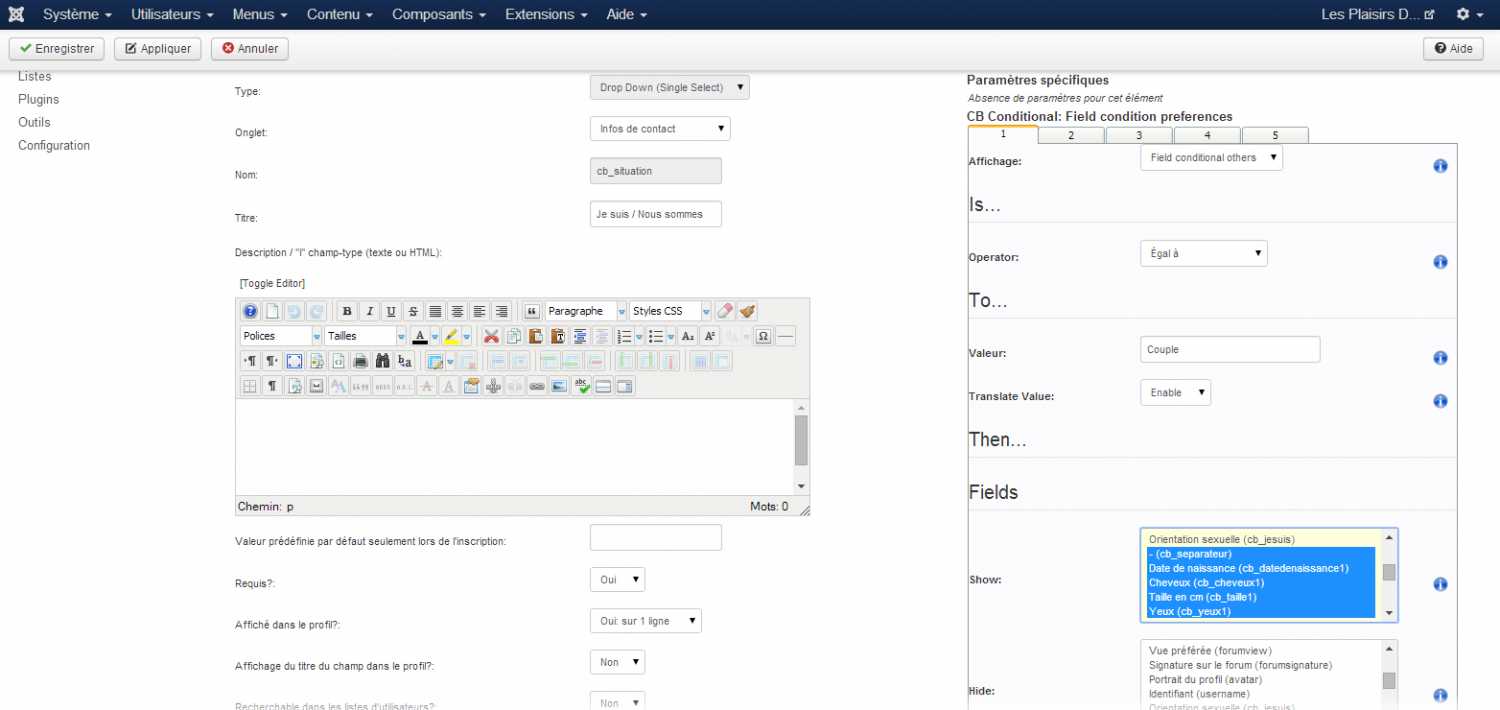
Does conditioning an entire field work? The conditioning of options maybe bugged. I won't know until I've started the CB Conditional upgrade for CB 2.0 (after CB Privacy, which is after CB Connect upgrade that am working on now).
Kyle (Krileon) Community Builder Team Member Before posting on forums:
Read FAQ thoroughly
+
Read our Documentation
+
Search the forums CB links:
Documentation
-
Localization
-
CB Quickstart
-
CB Paid Subscriptions
-
Add-Ons
-
Forge
-- If you are a Professional, Developer, or CB Paid Subscriptions subscriber and have a support issue please always post in your respective support forums for best results!
-- If I've missed your support post with a delay of 3 days or greater and are a Professional, Developer, or CBSubs subscriber please
send me a private message
with your thread and will reply when possible!
-- Please note I am available Monday - Friday from 8:00 AM CST to 4:00 PM CST. I am away on weekends (Saturday and Sunday) and if I've missed your post on or before a weekend after business hours please wait for the next following business day (Monday) and will get to your issue as soon as possible, thank you.
-- My role here is to provide guidance and assistance. I cannot provide custom code for each custom requirement. Please do not inquire me about custom development.
hello,
I can not really operate in CB_Conditionnal.
CB: 1.9.1
Joomla: 3.3.6
I followed what is explained in the tutorial, but despite that, I do not display cascading fields that depend on a previous choice in my forms.
I have a list of choices that allows then to provide information.
Lookup: Couple, Man, Woman
- If it's a man there some fields that should be displayed to complete.
- If it is a woman, other fields should be displayed to complete.
- If it's a couple, all fields must be displayed to complete.
Press F12 (should open the developer console) when viewing your registration or profile edit page then press F5 (should refresh the page), now check the Console tab and see if there are any fatal errors (they'll be in red). You may have a jQuery conflict that's breaking CB Conditional jQuery from showing and hiding fields dynamically.
If this is your first time using CB Conditional then don't jump straight to a complex configuration. Start simple to get familiar with the plugin. First hide a simple field you've created when another field is equal to a simple value (e.g. hide a select field if a text field is equal to 123).
Kyle (Krileon) Community Builder Team Member Before posting on forums:
Read FAQ thoroughly
+
Read our Documentation
+
Search the forums CB links:
Documentation
-
Localization
-
CB Quickstart
-
CB Paid Subscriptions
-
Add-Ons
-
Forge
-- If you are a Professional, Developer, or CB Paid Subscriptions subscriber and have a support issue please always post in your respective support forums for best results!
-- If I've missed your support post with a delay of 3 days or greater and are a Professional, Developer, or CBSubs subscriber please
send me a private message
with your thread and will reply when possible!
-- Please note I am available Monday - Friday from 8:00 AM CST to 4:00 PM CST. I am away on weekends (Saturday and Sunday) and if I've missed your post on or before a weekend after business hours please wait for the next following business day (Monday) and will get to your issue as soon as possible, thank you.
-- My role here is to provide guidance and assistance. I cannot provide custom code for each custom requirement. Please do not inquire me about custom development.