Skip to Content Skip to Menu

Articles with Auto Actions

  • Phaethon
  • Phaethon
  • ONLINE
  • Posts: 2
  • Thanks: 0
  • Karma: 0
3 days 10 hours ago #342934 by Phaethon
Articles with Auto Actions was created by Phaethon
Hi
I want to display new Joomla articles from specific categories in the CB Activity Stream. However, I don’t want them to appear simply as “new articles”. I need the activity entry to show the category name, because each category represents a different content type (e.g. a new route, a new mountain, etc.).Is it possible to achieve this using Auto Actions? If yes, is there any documentation or example on how to structure the Auto Action so that the activity entry reflects the article’s category?This is my first time working with CB Activity and Auto Actions, so any guidance would be greatly appreciated.
Thank you, Miltos

Please Log in or Create an account to join the conversation.

  • krileon
  • krileon
  • ONLINE
  • Posts: 49998
  • Thanks: 8547
  • Karma: 1466
19 hours 49 minutes ago #342938 by krileon
Replied by krileon on topic Articles with Auto Actions
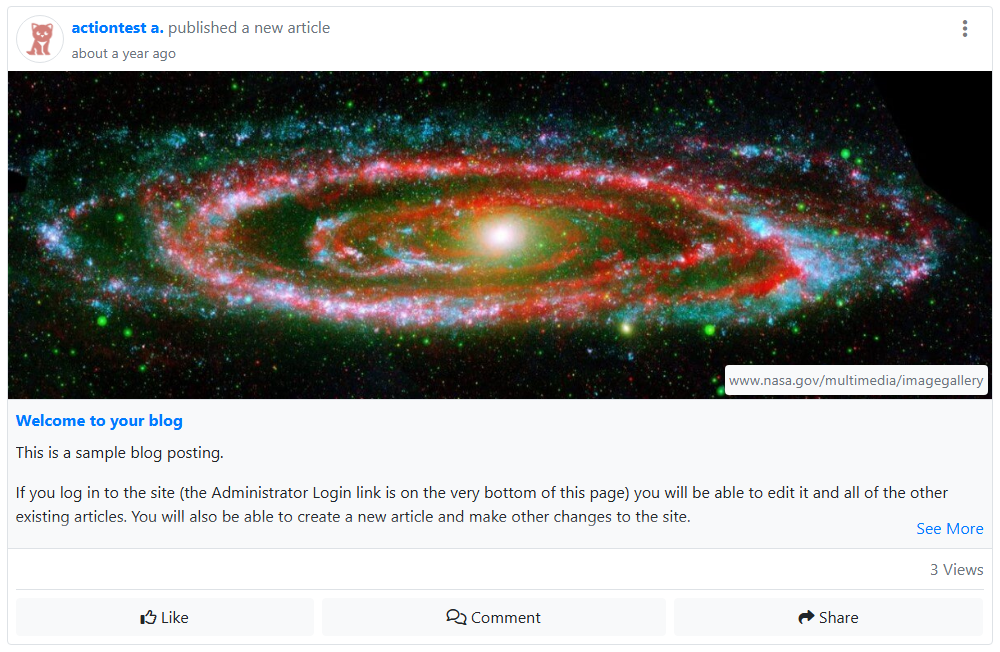
Below is how article activity renders. Where exactly do you want category to display? I'm thinking maybe after the title. So something like "published a new article in CATEGORY"?


I think it would maybe be easier for me to just improve the activity rendering then trying to create a new activity type entirely. I'll have it respect the Category Show/Hide parameter as well for sites that don't want it visible.


Kyle (Krileon)
Community Builder Team Member
Before posting on forums: Read FAQ thoroughly + Read our Documentation + Search the forums
CB links: Documentation - Localization - CB Quickstart - CB Paid Subscriptions - Add-Ons - Forge
--
If you are a Professional, Developer, or CB Paid Subscriptions subscriber and have a support issue please always post in your respective support forums for best results!
--
If I've missed your support post with a delay of 3 days or greater and are a Professional, Developer, or CBSubs subscriber please send me a private message with your thread and will reply when possible!
--
Please note I am available Monday - Friday from 8:00 AM CST to 4:00 PM CST. I am away on weekends (Saturday and Sunday) and if I've missed your post on or before a weekend after business hours please wait for the next following business day (Monday) and will get to your issue as soon as possible, thank you.
--
My role here is to provide guidance and assistance. I cannot provide custom code for each custom requirement. Please do not inquire me about custom development.

Please Log in or Create an account to join the conversation.

  • Phaethon
  • Phaethon
  • ONLINE
  • Posts: 2
  • Thanks: 0
  • Karma: 0
18 hours 7 minutes ago #342945 by Phaethon
Replied by Phaethon on topic Articles with Auto Actions
Hi Krileon, thanks for the reply.
We use articles (with the addition of custom fields) as a directory (hiking routes, climbing routes, crags, etc.). Yes, ok — this covers our needs. Can you guide me?

Please Log in or Create an account to join the conversation.

  • krileon
  • krileon
  • ONLINE
  • Posts: 49998
  • Thanks: 8547
  • Karma: 1466
17 hours 53 minutes ago - 17 hours 3 minutes ago #342947 by krileon
Replied by krileon on topic Articles with Auto Actions
You won't need to implement anything custom. I'm implementing support for the above as we speak. It'll display the category title and link to it as well (if category link is enabled in the article). The activity title will read as follows.

No Category: published a new article
Category: published a new article in CATEGORY
Parent Category: published a new article in CATEGORY of CATEGORY

Category and Parent Category will respect the article parameters in the Options > Category section of your articles, and globally, so they can be toggled on/off easily per-article if desired.


Kyle (Krileon)
Community Builder Team Member
Before posting on forums: Read FAQ thoroughly + Read our Documentation + Search the forums
CB links: Documentation - Localization - CB Quickstart - CB Paid Subscriptions - Add-Ons - Forge
--
If you are a Professional, Developer, or CB Paid Subscriptions subscriber and have a support issue please always post in your respective support forums for best results!
--
If I've missed your support post with a delay of 3 days or greater and are a Professional, Developer, or CBSubs subscriber please send me a private message with your thread and will reply when possible!
--
Please note I am available Monday - Friday from 8:00 AM CST to 4:00 PM CST. I am away on weekends (Saturday and Sunday) and if I've missed your post on or before a weekend after business hours please wait for the next following business day (Monday) and will get to your issue as soon as possible, thank you.
--
My role here is to provide guidance and assistance. I cannot provide custom code for each custom requirement. Please do not inquire me about custom development.
Last edit: 17 hours 3 minutes ago by krileon.
The following user(s) said Thank You: Phaethon

Please Log in or Create an account to join the conversation.

  • krileon
  • krileon
  • ONLINE
  • Posts: 49998
  • Thanks: 8547
  • Karma: 1466
15 hours 39 minutes ago #342959 by krileon
Replied by krileon on topic Articles with Auto Actions
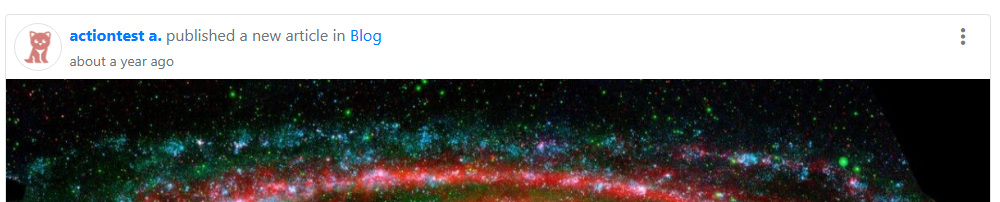
This is now implemented in the latest CB Activity build release. Below is an example of what the above will now display as since it is to a category called Blog.


Kyle (Krileon)
Community Builder Team Member
Before posting on forums: Read FAQ thoroughly + Read our Documentation + Search the forums
CB links: Documentation - Localization - CB Quickstart - CB Paid Subscriptions - Add-Ons - Forge
--
If you are a Professional, Developer, or CB Paid Subscriptions subscriber and have a support issue please always post in your respective support forums for best results!
--
If I've missed your support post with a delay of 3 days or greater and are a Professional, Developer, or CBSubs subscriber please send me a private message with your thread and will reply when possible!
--
Please note I am available Monday - Friday from 8:00 AM CST to 4:00 PM CST. I am away on weekends (Saturday and Sunday) and if I've missed your post on or before a weekend after business hours please wait for the next following business day (Monday) and will get to your issue as soon as possible, thank you.
--
My role here is to provide guidance and assistance. I cannot provide custom code for each custom requirement. Please do not inquire me about custom development.

Please Log in or Create an account to join the conversation.

Moderators: beatnantkrileon
Powered by Kunena Forum