
Skip to Content Skip to Menu

Problem with Activity-Stream and Access-Levels

  • Cam2024
  • Cam2024
  • OFFLINE
  • Posts: 3
  • Thanks: 1
  • Karma: 0
6 days 21 hours ago #342937 by Cam2024
I have a blog (still offline) with an activity stream. Much of it is open to the public, but some of it should only be visible to registered users.

I have the problem that when I create an activity, user groups are not respected. Regardless of whether the user is registered, private, or connected. No matter what I choose, it is always visible to everyone.

Can someone tell me what settings I need to make?

Thanx

Thanx 

Please Log in or Create an account to join the conversation.

  • krileon
  • krileon
  • OFFLINE
  • Posts: 50014
  • Thanks: 8554
  • Karma: 1467
6 days 31 minutes ago #342941 by krileon
Within CB > Configuration > Moderation ensure you've Moderator View Access Level set correctly. If you're unsure what to set it to then set it to Super Users. CB Moderators are exempt from privacy controls so that's likely the culprit.


Kyle (Krileon)
Community Builder Team Member
Before posting on forums: Read FAQ thoroughly + Read our Documentation + Search the forums
CB links: Documentation - Localization - CB Quickstart - CB Paid Subscriptions - Add-Ons - Forge
--
If you are a Professional, Developer, or CB Paid Subscriptions subscriber and have a support issue please always post in your respective support forums for best results!
--
If I've missed your support post with a delay of 3 days or greater and are a Professional, Developer, or CBSubs subscriber please send me a private message with your thread and will reply when possible!
--
Please note I am available Monday - Friday from 8:00 AM CST to 4:00 PM CST. I am away on weekends (Saturday and Sunday) and if I've missed your post on or before a weekend after business hours please wait for the next following business day (Monday) and will get to your issue as soon as possible, thank you.
--
My role here is to provide guidance and assistance. I cannot provide custom code for each custom requirement. Please do not inquire me about custom development.

Please Log in or Create an account to join the conversation.

  • Cam2024
  • Cam2024
  • OFFLINE
  • Posts: 3
  • Thanks: 1
  • Karma: 0
5 days 21 hours ago - 5 days 21 hours ago #342953 by Cam2024
Hi :)
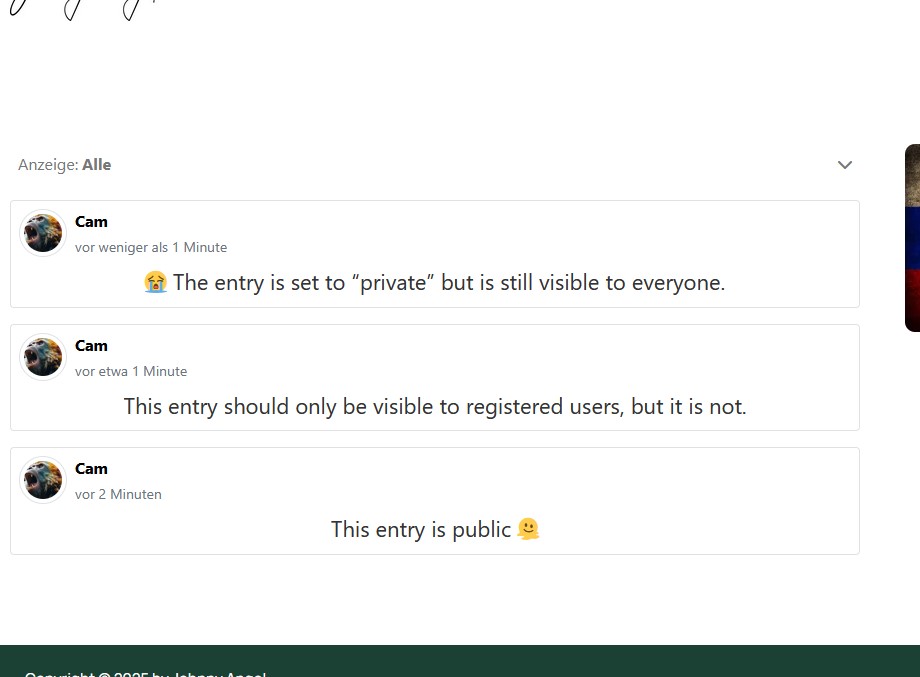
When I set the ‘Moderator View Access Level’ to Super User, the public only sees “No posts to display,” even though there are posts for the public. If I set it to ‘Public,’ the public also sees the posts for the other access levels. I just tried it again.

In the attached screenshot, you can see the entry that has been marked as ‘private’ but is still visible to the public. 
Last edit: 5 days 21 hours ago by Cam2024. Reason: Screenshot added

Please Log in or Create an account to join the conversation.

  • krileon
  • krileon
  • OFFLINE
  • Posts: 50014
  • Thanks: 8554
  • Karma: 1467
5 days 21 hours ago #342956 by krileon
Do not set CB Moderator View Access Level to Public. You're giving everyone CB Moderator permissions. The reason nothing is accessible to the public is probably because the profiles themselves are not accessible to the public. People are not allowed to see what they cannot access. Examples as follows.

Profile Privacy = Private
Result = Posts are not visible

CB > Configuration > User Profile > Profile View Access Level = Registered
Result = Posts are not visible

These are some examples that will also prevent post visibility as those all restrict access to profiles themselves.


Kyle (Krileon)
Community Builder Team Member
Before posting on forums: Read FAQ thoroughly + Read our Documentation + Search the forums
CB links: Documentation - Localization - CB Quickstart - CB Paid Subscriptions - Add-Ons - Forge
--
If you are a Professional, Developer, or CB Paid Subscriptions subscriber and have a support issue please always post in your respective support forums for best results!
--
If I've missed your support post with a delay of 3 days or greater and are a Professional, Developer, or CBSubs subscriber please send me a private message with your thread and will reply when possible!
--
Please note I am available Monday - Friday from 8:00 AM CST to 4:00 PM CST. I am away on weekends (Saturday and Sunday) and if I've missed your post on or before a weekend after business hours please wait for the next following business day (Monday) and will get to your issue as soon as possible, thank you.
--
My role here is to provide guidance and assistance. I cannot provide custom code for each custom requirement. Please do not inquire me about custom development.
The following user(s) said Thank You: Cam2024

Please Log in or Create an account to join the conversation.

  • Cam2024
  • Cam2024
  • OFFLINE
  • Posts: 3
  • Thanks: 1
  • Karma: 0
5 days 18 hours ago #342960 by Cam2024
You made my day! Thank you very much :)
The following user(s) said Thank You: krileon

Please Log in or Create an account to join the conversation.

Moderators: beatnantkrileon
Powered by Kunena Forum
