Skip to Content Skip to Menu

activityButtonMore change color

  • Juhuui
  • Juhuui
  • OFFLINE
  • Posts: 8
  • Thanks: 1
  • Karma: 0
5 days 12 hours ago #343007 by Juhuui
activityButtonMore change color was created by Juhuui
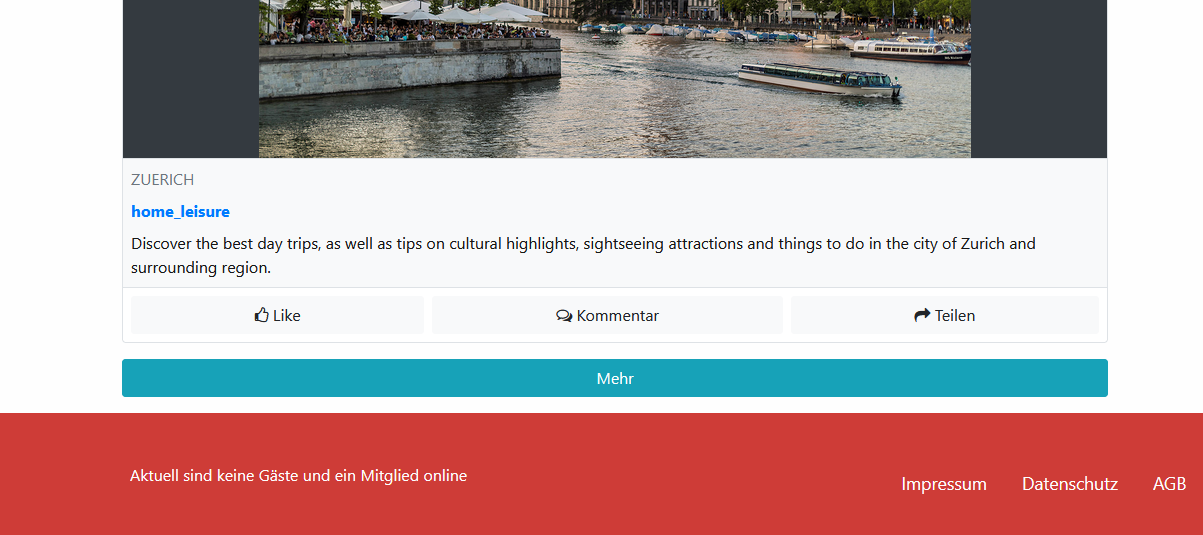
Hi there
I would like to change the color from "activityButtonMore". I understand that I need to create a new template in the Activity plugin. I have created a new folder and only want to copy the template.css file into my new template. Right?
But in the template.css file cant find "activityButtonMore". Where is that?

Is my reasoning wrong?
Attachments:

Please Log in or Create an account to join the conversation.

  • krileon
  • krileon
  • ONLINE
  • Posts: 50051
  • Thanks: 8562
  • Karma: 1467
5 days 3 hours ago #343010 by krileon
Replied by krileon on topic activityButtonMore change color
You can change the color entirely with CSS overrides. No need for a custom template. See the below on how to add CSS overrides to CB. You can also use Joomla template user.css file as well.

www.joomlapolis.com/blog/kyle/18711-template-css-overrides-made-easy

Below is an example of how to change the color of the button.
Code:
.cb_template .activityButtonMore { color: #fff; background-color: #17a2b8; border-color: #17a2b8; } .cb_template .activityButtonMore:hover { color: #fff; background-color: #138496; border-color: #117a8b; } .cb_template .activityButtonMore:not(:disabled):not(.disabled):active, .cb_template .activityButtonMore:not(:disabled):not(.disabled).active { color: #fff; background-color: #117a8b; border-color: #10707f; } .cb_template .activityButtonMore:focus, .cb_template .activityButtonMore.focus { color: #fff; background-color: #138496; border-color: #117a8b; box-shadow: 0 0 0 0.2rem rgba(58, 176, 195, 0.5); }

I've provided all the button states in the CSS, but you may only need to adjust some of that. So feel free to discard whatever isn't necessary for the look you're wanting.

Another option is to set CB to match whatever your Joomla template Bootstrap colors are. This is done by putting it in Bootstrap 5 Compatibility within CB > Configuration > Integrations. This should cause all button styling to match your template.

If you'd still like to make a custom template for CB Activity I recommend reading through the below topics as they provide examples of how to override specific template files.

www.joomlapolis.com/forum/single-add-on-support/247792-add-label-to-article-comments#342592
www.joomlapolis.com/forum/professional-members-support/247644-article-custom-fields#341862

The file you're needing to override will be /activity/rows.php as it contains the more button.


Kyle (Krileon)
Community Builder Team Member
Before posting on forums: Read FAQ thoroughly + Read our Documentation + Search the forums
CB links: Documentation - Localization - CB Quickstart - CB Paid Subscriptions - Add-Ons - Forge
--
If you are a Professional, Developer, or CB Paid Subscriptions subscriber and have a support issue please always post in your respective support forums for best results!
--
If I've missed your support post with a delay of 3 days or greater and are a Professional, Developer, or CBSubs subscriber please send me a private message with your thread and will reply when possible!
--
Please note I am available Monday - Friday from 8:00 AM CST to 4:00 PM CST. I am away on weekends (Saturday and Sunday) and if I've missed your post on or before a weekend after business hours please wait for the next following business day (Monday) and will get to your issue as soon as possible, thank you.
--
My role here is to provide guidance and assistance. I cannot provide custom code for each custom requirement. Please do not inquire me about custom development.
The following user(s) said Thank You: Juhuui

Please Log in or Create an account to join the conversation.

Moderators: beatnantkrileon
Powered by Kunena Forum