
Skip to Content Skip to Menu

🌲 Merry Christmas! Great Savings on Professional and Developer Memberships! Get 25% off now with code XMAS-2025!

Issue with my gallery thumbnails

20 hours 15 minutes ago #342863 by akseldahlnorway
Issue with my gallery thumbnails was created by akseldahlnorway
After upgrading to the newest gallery plugin, my previews are not showing properly. It becomes large photos. None of the template parameter profiles works as should, except from the one with file name links.

Any help would be appreciated. I can create a superuser for you to have a look at it.

PS: I have migrated my site to a new domain and will reopen it at the beginning of January, but I am fairly sure it was the update to the new plugin that made the issue, as everything else seems to work fine.

Please Log in or Create an account to join the conversation.

12 hours 35 minutes ago #342866 by Toulouzing
Replied by Toulouzing on topic Issue with my gallery thumbnails
Hello ! I have the same concern very probably since the CB Gallery was updated. Once I import a picture, the album thumbnail becomes large.

Probably something to add to the current wish list for next update of CB Gallery, with parsed #hashtags in description of media and unpublish/publish enhancements ;-)

Please Log in or Create an account to join the conversation.

  • krileon
  • krileon
  • ONLINE
  • Posts: 49958
  • Thanks: 8538
  • Karma: 1466
7 hours 51 minutes ago - 7 hours 48 minutes ago #342870 by krileon
Replied by krileon on topic Issue with my gallery thumbnails
I'm not sure what you mean by thumbnail becomes large images? Can you provide a screenshot with a test account using a test image? The default template for CB Gallery should show the thumbnails as shown on our demo site below.

demo.cbdemosites.com/demos/cb-gallery/grid-template/gallery/112

They will fill the container though. So if your image isn't squared aspect ratio some of the image maybe cut off, etc.. If you're wanting to turn that behavior off it's easily adjusted using CSS and can provide an example if needed.


Kyle (Krileon)
Community Builder Team Member
Before posting on forums: Read FAQ thoroughly + Read our Documentation + Search the forums
CB links: Documentation - Localization - CB Quickstart - CB Paid Subscriptions - Add-Ons - Forge
--
If you are a Professional, Developer, or CB Paid Subscriptions subscriber and have a support issue please always post in your respective support forums for best results!
--
If I've missed your support post with a delay of 3 days or greater and are a Professional, Developer, or CBSubs subscriber please send me a private message with your thread and will reply when possible!
--
Please note I am available Monday - Friday from 8:00 AM CST to 4:00 PM CST. I am away on weekends (Saturday and Sunday) and if I've missed your post on or before a weekend after business hours please wait for the next following business day (Monday) and will get to your issue as soon as possible, thank you.
--
My role here is to provide guidance and assistance. I cannot provide custom code for each custom requirement. Please do not inquire me about custom development.
Last edit: 7 hours 48 minutes ago by krileon.

Please Log in or Create an account to join the conversation.

  • krileon
  • krileon
  • ONLINE
  • Posts: 49958
  • Thanks: 8538
  • Karma: 1466
7 hours 44 minutes ago #342872 by krileon
Replied by krileon on topic Issue with my gallery thumbnails
The below CSS can be used to turn off filling the containers if you don't want that behavior. It will make for a rather unsightly grid though with various sizes of previews.
Code:
.cb_template .galleryPreviewsFill .galleryFolderPreview img, .cb_template .galleryPreviewsFill .galleryItemPreview img { width: auto; height: auto; }

You can add this to CB using CSS overrides feature shown below.

www.joomlapolis.com/blog/kyle/18711-template-css-overrides-made-easy

Will review maybe making another template that has this behavior turned off by default for those that want it.


Kyle (Krileon)
Community Builder Team Member
Before posting on forums: Read FAQ thoroughly + Read our Documentation + Search the forums
CB links: Documentation - Localization - CB Quickstart - CB Paid Subscriptions - Add-Ons - Forge
--
If you are a Professional, Developer, or CB Paid Subscriptions subscriber and have a support issue please always post in your respective support forums for best results!
--
If I've missed your support post with a delay of 3 days or greater and are a Professional, Developer, or CBSubs subscriber please send me a private message with your thread and will reply when possible!
--
Please note I am available Monday - Friday from 8:00 AM CST to 4:00 PM CST. I am away on weekends (Saturday and Sunday) and if I've missed your post on or before a weekend after business hours please wait for the next following business day (Monday) and will get to your issue as soon as possible, thank you.
--
My role here is to provide guidance and assistance. I cannot provide custom code for each custom requirement. Please do not inquire me about custom development.

Please Log in or Create an account to join the conversation.

4 hours 25 minutes ago #342879 by Toulouzing
Replied by Toulouzing on topic Issue with my gallery thumbnails
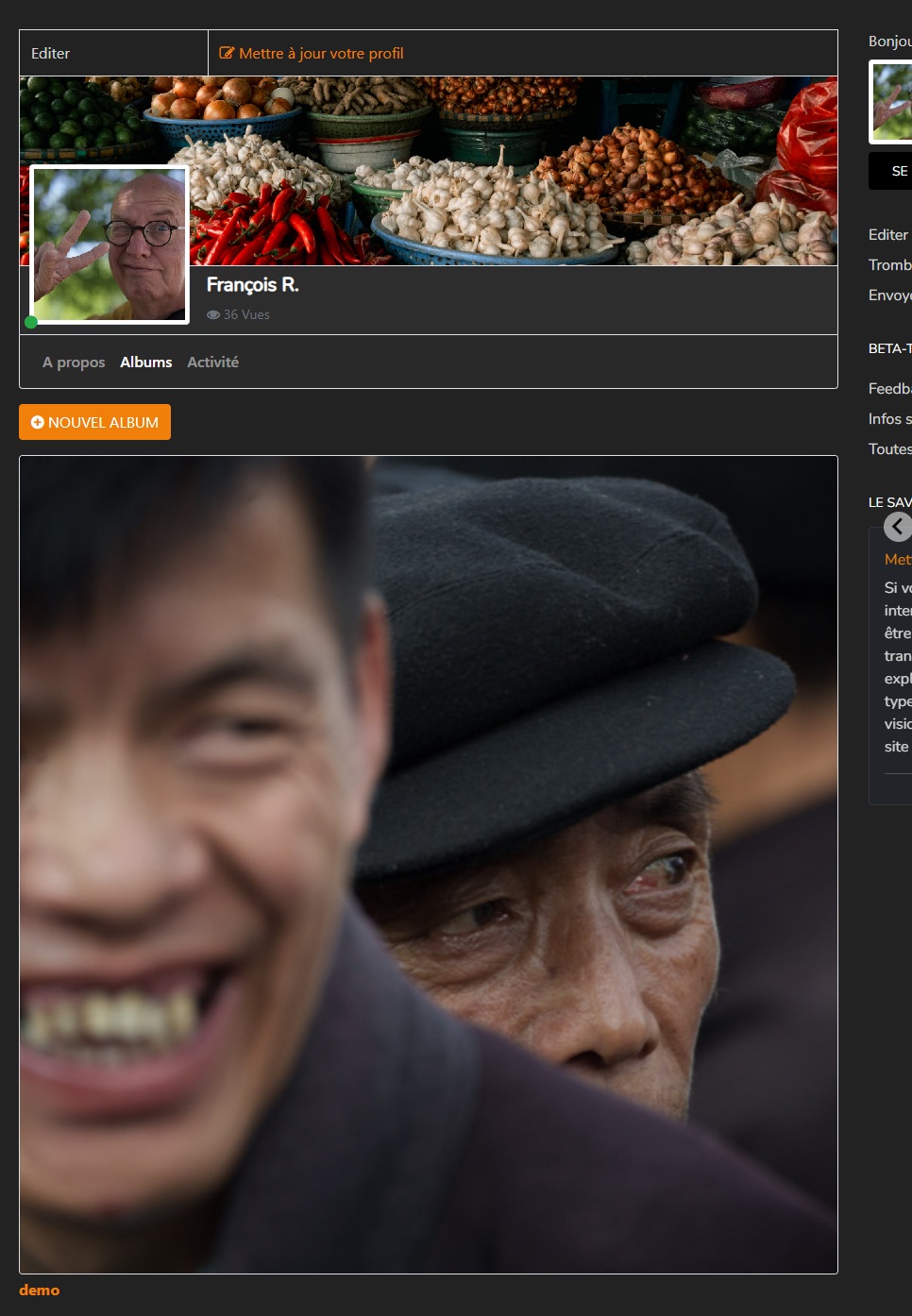
On my side, I tried the css you provide and it fixed the problem of "large image" ( i am using the masonry layout). So, it's good workaround for me. But, as said in the 1st post, we did not had this weird display before.
Here a screen capture of a profile/album ( without the css hack) where you can see the large thumbnail- In your PM, you have also an access to the site if you want to check it


Please Log in or Create an account to join the conversation.
Moderators: beatnantkrileon
Powered by Kunena Forum
